Introduction
Most manufacturers struggle to get machine data where it actually needs to go. Connecting shop floor equipment to ERP systems, production workflows, and OT/IT networks simultaneously is a real coordination challenge — and without prior experience, it's easy to stall before the first sensor streams a single data point. IT-OT integration specialists, manufacturing engineers, or IIoT solution providers typically lead this work for good reason.
Without a structured approach, data silos persist, machine data never reaches the ERP, legacy equipment gets left offline, and ROI stalls. This guide covers the complete integration path from assessment through validation, helping manufacturers bridge the gap between shop floor machines and enterprise business systems.
TL;DR
- Enterprise IoT integration covers five phases: readiness assessment, platform selection, connectivity setup, system connection, and validation
- Start with a readiness audit covering existing ERP, OT infrastructure, machine protocols, and network architecture
- Legacy machines present the hardest integration challenge—verify multi-protocol and multi-vendor connectivity support before committing
- Post-integration validation—data accuracy, latency, ERP sync—determines whether the deployment actually performs
- Team training and change management are the most overlooked factors in post-go-live performance
What to Know Before Integrating an IoT Platform in an Enterprise Environment
IoT integration complexity in enterprise manufacturing scales directly with three factors: number of connected assets, variety of machine protocols (MTConnect, OPC-UA, Fanuc FOCAS, Siemens, and others), and how deeply the platform must sync with ERP, MES, or SCADA systems.
Manufacturers must address two distinct integration layers. The OT layer covers machines, PLCs, and sensors on the shop floor. The IT layer encompasses ERP, business intelligence, and cloud systems. Bridging them requires explicit planning because these domains historically operated in isolation for both functional and security reasons.
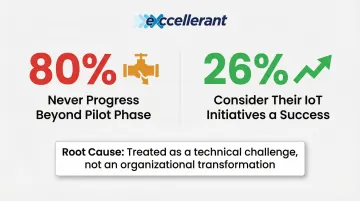
Research shows that roughly 80% of industrial IoT initiatives never progress beyond the pilot phase, with only 26% of companies considering their IoT initiatives a success. The primary culprit is treating IIoT as a purely technical challenge rather than an organizational transformation.
Prerequisites and Readiness Checks
Before any integration begins, assess your existing infrastructure:
Network Infrastructure Evaluation:
- Current network architecture (wired vs. wireless, bandwidth capacity)
- Existing network segmentation between OT and IT domains
- Available DMZ or VLAN segmentation for security
Machine Communication Capabilities:
- Each machine's output port availability and type
- Protocol compatibility across your machine fleet
- Hardware adapter requirements for legacy equipment
ERP/MES System Readiness:
- API availability and documentation
- Middleware support options
- Data field mapping requirements
Non-Negotiables—Do Not Proceed If:
- OT/IT network segmentation is absent — a critical security risk. NIST SP 800-82r3 recommends the Purdue Model or ISA-95 levels with DMZ enforcement boundaries between segments.
- Machine protocols are unknown or undocumented — you cannot integrate what you cannot identify.
- No data governance policy exists — 46% of manufacturers lack a corporate-wide data governance plan, and only 39% have a process to verify data accuracy, a gap that directly undermines integration success.
The Protocol Compatibility Challenge
Many manufacturers run mixed fleets—new CNC machines alongside legacy equipment from the 1980s–2000s. Your IoT platform must handle all of them. Modbus remains the most widely implemented protocol, while MTConnect is used on more than 250,000 devices in over 50 countries, giving machines a shared language that cuts integration costs.
Platforms built for universal machine connectivity eliminate the need for separate hardware per machine type. Excellerant's IIoT platform, for instance, connects any brand or protocol through a single system — including MTConnect, OPC UA, Fanuc FOCAS, HAAS MNET, Mazak Mazatrol, and serial communications via RS-232 or PLC intermediaries.
Once you've confirmed protocol coverage, the next step is assembling the hardware and software components the integration actually requires.
Tools, Connections, and Systems Required
Before integration starts, gather these components:
Hardware Requirements:
- Edge gateways or hardware adapters for machines lacking native connectivity
- Network switches and cabling or wireless access points for shop floor coverage
- Industrial-grade displays for operator interfaces (optional)
Software and Access Requirements:
- API credentials or middleware for the ERP system
- IoT platform licensing with appropriate user access configured
- Active Directory integration for user management (if applicable)
Optional Components:
- Cloud connectivity (required for cloud-hosted deployments; not needed for on-premise)
- Third-party middleware (only when the ERP lacks direct API support)
- Dedicated data historians (when the ERP does not store production records natively)
How to Integrate an IoT Platform with Enterprise Systems: Step-by-Step
Integration follows a defined sequence. Skipping phases or running them in parallel without coordination is a leading cause of data gaps, security exposures, and rework. A disciplined rollout may take weeks to months depending on fleet size; full digital transformations typically take two to three years to show P&L impact. Each phase below builds on the last — don't shortcut the order.
Assess and Map Your Current Systems
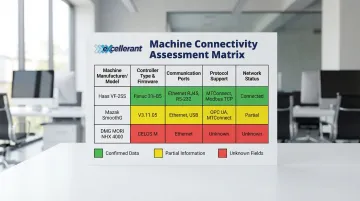
Document every machine, controller type, protocol, and output capability on the shop floor before selecting any software. Create a machine connectivity matrix that includes:
- Machine manufacturer, model, and year
- Controller type and firmware version
- Available communication ports (Ethernet, RS-232, proprietary)
- Current protocol support (MTConnect, OPC-UA, Modbus, etc.)
- Network connectivity status (wired, wireless, none)
Map the ERP/MES data inputs that need to be populated by machine data:
- Production counts and cycle times
- Downtime events and reason codes
- Job status and completion updates
- Quality metrics and scrap counts
Identify whether the ERP uses REST APIs, flat file imports, or database connectors. Engage your ERP vendor or implementation partner early—API access, field mapping, and data governance approvals can take weeks to obtain and are the most common cause of timeline overruns.
Select and Configure the IoT Platform
Choose a platform that natively supports the machine protocols in your environment and has documented integration paths to your ERP system.
Evaluation Criteria:
- Supports your specific machine protocols without requiring custom development
- Scales from 10 to 100+ machines without re-architecting
- Includes role-based access and encrypted data transmission with OT/IT segmentation
- Offers documented integration paths to SAP, Oracle, Epicor, or your specific ERP
- Provides USA-based technical support with manufacturing domain expertise
Configure the platform's data collection parameters:
- Define polling intervals (balance between real-time visibility and network load)
- Set up machine state rules (running, idle, faulted) based on spindle speed, feed rate, and other signals
- Map raw machine signals to standardized data fields your ERP expects
- Establish data validation rules to ensure accuracy before ERP sync
Excellerant's IIoT platform, for example, connects to any machine regardless of age or brand, and uses Open API support to enable two-way data sync with ERP systems including SAP and Oracle — without custom middleware.
Connect Machines and Establish Data Flows
Install edge gateways or hardware adapters on machines lacking native network capability. For modern CNC machines, a direct Ethernet or WiFi connection is usually all that's needed. For legacy devices, connectivity may require serial communications or adding PLCs as intermediary devices.
Configure network routes between the OT floor network and the IoT platform:
- Use DMZ or segmented VLANs to maintain OT/IT security separation
- Establish firewall rules that only permit connections between adjacent network levels
- Prevent Level 4 devices (Enterprise/ERP) from directly communicating with Level 2, 1, or 0 devices (Control/Field)
- Document all network configuration decisions for future reference
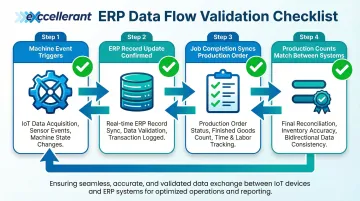
Once network routes are confirmed, establish and test bidirectional or unidirectional data flows between the IoT platform and ERP:
- Confirm that machine events trigger corresponding ERP record updates
- Validate that job completion updates production order status in real time
- Test that downtime events populate ERP fields with correct reason codes
- Verify that production counts match between IoT platform and ERP
Test and Validate Before Full Go-Live
Run a parallel operation period: compare IoT-reported machine data against manually collected production records for 1–2 weeks to identify discrepancies in cycle counts, downtime classification, or job tagging.
Validate ERP data accuracy post-integration. In a partnership with PTC, SIG identified areas to reduce manual inputs, which allowed them to use accurate, real-time data as the basis for KPIs. As a result, the speed KPIs of their production lines improved measurably.
Key Validation Checkpoints:
- Do machine cycle counts match manual counts within acceptable tolerance?
- Is the lag between machine event and ERP update within limits for your production environment?
- Are machines correctly classified as running, idle, or faulted?
- Do all mapped data fields populate correctly in the ERP system?
Customers report measurable improvements. Dan Villemaire from C&M Machine Products notes: "The accuracy of information that's coming into our ERP system is exponentially better than what it was before. We have been able to improve the accuracy of our costs and increase our value to our customers."
Common IoT Integration Problems and Fixes
Most integration failures trace back to the same three points: connectivity gaps, data quality issues, and system sync errors. Knowing where they typically break makes them far easier to prevent — or fix quickly when they do.
Legacy Machine Connectivity Gaps
Problem: Older CNC machines (pre-2000s) lack native Ethernet ports or modern protocol support, leaving them invisible to the IoT platform.
Likely Cause: The platform was designed for newer machines with MTConnect or OPC-UA support only, without legacy protocol bridging capabilities.
Fix:
- Add a hardware adapter or retrofitted DNC gateway to translate RS-232 or proprietary serial output into a platform-readable format
- Use wireless DNC adapters on older RS-232 connections to create a serial-to-network bridge without rewiring
- For more complex scenarios, deploy PLCs as intermediary devices to handle protocol translation
- Confirm the platform supports legacy protocol bridging before purchase
Data Latency and ERP Sync Failures
Problem: Machine events appear in the IoT dashboard but take minutes or hours to reflect in the ERP—or don't sync at all.
Likely Cause: The API polling intervals are misconfigured, firewall rules are blocking communication between OT and IT network segments, or ERP middleware is not correctly mapping IoT data fields to ERP fields.
Fix:
- Review network firewall rules for OT-to-IT traffic and ensure proper DMZ configuration
- Reduce API polling intervals to improve sync frequency
- Validate field mapping in the middleware configuration against ERP data requirements
- Test ERP sync with a controlled machine event before scaling to the full floor
- Check that the IoT platform's data format matches ERP expectations exactly
Inconsistent Machine State Classification
Problem: The IoT platform reports machines as "running" when they are actually idle or in setup mode—skewing OEE and utilization metrics.
Likely Cause: Machine state rules were not configured to account for all spindle and feed rate combinations, or the machine's output signals were not fully mapped during setup.
Fix:
- Conduct a signal audit for each machine type to understand all possible state combinations
- Review state logic rules in the IoT platform configuration
- Adjust threshold values to correctly distinguish productive cycle time from non-cutting activity
- Test state classification across multiple production scenarios before declaring it accurate
- Document state logic rules for each machine type for future troubleshooting
Pro Tips for a Successful Enterprise IoT Platform Integration
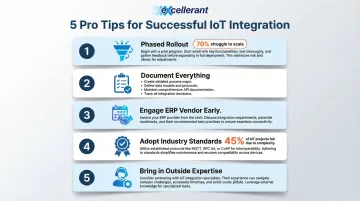
Five principles separate IoT integrations that deliver ROI from those that stall. Apply these before you start:
Integrate in phases, not all at once. Start with a single machine cell or production line as a pilot. Validate data quality and ERP sync in that controlled environment, then scale. More than 70% of companies struggle to implement and scale advanced technologies in a way that moves operational KPIs—phased rollouts cut that risk before a facility-wide rollout.
Document every connectivity decision during the pilot. Record polling intervals, state logic rules, signal mappings, and custom configurations for each machine type. That documentation becomes the template for every subsequent asset onboarded and cuts rework time considerably.
Engage your ERP vendor or implementation partner early. API access, field mapping, and data governance approvals can take weeks. Delays here are the most common cause of timeline overruns in IoT integration projects. Schedule those meetings before hardware installation begins.
Adopt industry standards for scalability. Currently, 45% of manufacturers use an architecture standard, and 54% use a unified data model. Standards like MTConnect and OPC UA keep your integration viable as machinery is replaced or upgraded—no vendor lock-in, no custom integration rebuilds.
Know when to bring in outside expertise. If complexity exceeds internal capacity, engage a specialist with hands-on experience in manufacturing IoT environments. Providers with 30+ years of machine tool networking experience bring the depth needed to handle mixed fleets and complex ERP integrations efficiently.
Conclusion
The quality of an IoT platform integration in enterprise manufacturing is determined by preparation and sequencing—rushed setups with undefined data strategies and unchecked legacy connectivity create technical debt that compounds over time.
A phased, validated approach delivers lasting results: assess the environment before selecting a platform, run a pilot before scaling, and confirm ERP sync is accurate before declaring the integration complete. Done right, shop floor data flows directly into business systems — sharpening production forecasts and cutting unplanned downtime.
Rory Miller from McMellon Bros. summarizes the transformation: "ERP has become a more powerful tool. I can pull it up at any time and find out what's happening with a customer's parts. If we're not on pace, we can fix it." That kind of visibility — knowing exactly where a job stands without walking the floor or chasing updates — is what separates shops that react to problems from those that prevent them.
Frequently Asked Questions
What is IoT system integration?
IoT system integration is the process of connecting IoT devices and platforms to existing enterprise systems (ERP, MES, SCADA) so that data collected from physical assets flows automatically into business workflows and decision-making tools, eliminating manual data entry and giving operations teams live visibility into production.
What are the four types of IoT platforms?
The four main types are connectivity platforms (manage device communication), device management platforms (monitor and control assets), data/analytics platforms (process and visualize sensor data), and application enablement platforms — which let developers build IoT applications directly on top of connected data streams.
Can IoT platforms integrate with legacy machines?
Yes. Hardware adapters, edge gateways, or DNC solutions translate older serial and proprietary protocols (RS-232, Fanuc, Siemens) into formats modern IoT platforms can ingest. The key requirement is platform support for multi-protocol bridging, sometimes with PLCs acting as intermediary devices.
What is the difference between IT and OT in IoT integration?
OT (operational technology) covers shop floor systems like CNC machines, PLCs, and sensors, while IT (information technology) covers ERP, databases, and business applications. IoT integration bridges these two layers, which historically operated in isolation for both functional and security reasons.
How long does IoT platform integration take in a manufacturing environment?
A single-cell pilot with modern machines typically takes 2–4 weeks. A full facility rollout with mixed legacy equipment and ERP integration runs 3–6 months or more, and enterprise-wide digital transformations often take two to three years to show measurable P&L impact.
How do I choose the right IoT platform for my enterprise?
Prioritize compatibility with your machine protocols and ERP system, scalability for future equipment, and OT/IT network segmentation support. USA-based technical support with manufacturing domain expertise matters more than most buyers expect — verify legacy protocol support before signing anything.